Mostrar Mensajes

Esta sección te permite ver todos los posts escritos por este usuario. Ten en cuenta que sólo puedes ver los posts escritos en zonas a las que tienes acceso en este momento.


Mensajes - polosa

Páginas: [1]
1
Visual Basic 6 / How do I reduce memory consumption
« en: Diciembre 30, 2012, 07:32:47 pm »
Sorry, my English is not good.

Private k_items (65535) As Long
Private l_items (65535) As Long
Private f_items (65535) As Long

Such memory consumption will be more

So I put him into the following

Private k_items (999) As Long
Private l_items (999) As Long
Private f_items (999) As Long

To reduce the number of memory

Ask the following array How to reduce memory consumption.

In addition, I want to how the next into a "Clear All" option.
thank


Código: [Seleccionar]
Option Explicit
Private Declare Sub RtlMoveMemory Lib "kernel32" (ByRef lpDest As Any, ByRef lpSource As Any, ByVal cBytes As Long)

Private k_items(999) As Long
Private l_items(999) As Long
Private f_items(999) As Long
Private Items        As Object
Private fn           As Long
Private ln           As Long

Private Sub Class_Initialize()
    Dim i As Long
   
    Set Items = CreateObject("Scripting.Dictionary")
    For i = 0 To 999
        f_items(i) = 999 - i
        k_items(i) = -1
    Next
   
    fn = 1000
End Sub
Private Sub Class_Terminate()
    Set Items = Nothing
End Sub
Public Function Add(Obj As Object) As Boolean
    Dim i As Long
   
    If ln = 1000 Then
        Add = False
        Exit Function
    End If
   
    fn = fn - 1
   
    l_items(ln) = f_items(fn)
    k_items(f_items(fn)) = ln

    Items.Add f_items(fn), Obj
    ln = ln + 1
    Add = True
End Function
Public Sub Remove(ByVal index As Long)
    Dim i As Long
   
    If Not (index >= 0 And index <= ln - 1) Then Exit Sub
   
    f_items(fn) = l_items(index)
    fn = fn + 1
   
    k_items(l_items(index)) = -1
    Items.Remove l_items(index)
   
    If index < ln - 1 Then
        For i = index + 1 To ln - 1
            k_items(l_items(i)) = k_items(l_items(i)) - 1
        Next
       
        RtlMoveMemory l_items(index), l_items(index + 1), (ln - (index + 1)) * 4
    End If
   
    ln = ln - 1
End Sub
Public Property Get Item(ByVal index As Long) As clsItem
    If Not (index >= 0 And index <= ln - 1) Then Exit Property
    Set Item = Items.Item(l_items(index))
End Property
Public Property Get keyByIndex(ByVal index As Long) As Long
    If index >= 0 And index <= ln - 1 Then
        keyByIndex = l_items(index)
    Else
        keyByIndex = -1
    End If
End Property
Public Property Get indexByKey(ByVal Key As Long) As Long
    If Key >= 0 And Key <= 999 Then
        indexByKey = k_items(Key)
    Else
        indexByKey = -1
    End If
End Property
Public Property Get itemByKey(ByVal Key As Long) As clsItem
On Error GoTo 1:
    Set itemByKey = Items.Item(Key)
1:
End Property
Public Property Get Count() As Long
    Count = ln
End Property
Public Sub Exchange(ByVal i As Long, ByVal j As Long)
    Dim temp As Long
    temp = l_items(i)
    k_items(temp) = j
    k_items(l_items(j)) = i
    l_items(i) = l_items(j)
    l_items(j) = temp
End Sub
Public Sub Sort(ByVal key1 As Long, ByVal key2 As Long)
    Dim i      As Long
    Dim index1 As Long
    Dim index2 As Long
   
    If key1 >= 0 And key1 <= 999 Then index1 = k_items(key1) Else index1 = -1
    If key2 >= 0 And key2 <= 999 Then index2 = k_items(key2) Else index2 = -1
   
    If (index1 >= 0 And index1 <= ln - 1) And _
       (index2 >= 0 And index2 <= ln - 1) And _
        index1 <> index2 Then
       
        If index1 > index2 Then
            For i = index2 To index1 - 1
                k_items(l_items(i)) = k_items(l_items(i)) + 1
            Next
           
            i = l_items(index1)
            k_items(i) = index2
           
            RtlMoveMemory l_items(index2 + 1), l_items(index2), (index1 - index2) * 4
           
            l_items(index2) = i
        Else
            For i = index1 + 1 To index2
                k_items(l_items(i)) = k_items(l_items(i)) - 1
            Next
           
            i = l_items(index1)
            k_items(i) = index2
           
            RtlMoveMemory l_items(index1), l_items(index1 + 1), (index2 - index1) * 4
           
            l_items(index2) = i
        End If
    End If
End Sub

2
Visual Basic 6 / I have a question to ask everyone list of virtual
« en: Agosto 11, 2012, 10:26:52 am »
My English is not good sorry.

I try to create a quick list of virtual.As shown below


When many of the list items. Remove items without any problems.
When I left the two projects I try to delete one of the items but at the same time remove the two projects.
Wrong I Remove it?


http://www.mediafire.com/?qv8122rlruia953

3
Visual Basic 6 / Re:[Problem] What about the problem of sorting a string array
« en: Septiembre 11, 2011, 10:54:46 pm »
I have thought about. Just does not string value in the bear know how to deal with, please advise.

4
Visual Basic 6 / [Problem] What about the problem of sorting a string array
« en: Septiembre 11, 2011, 11:44:47 am »
My English is bad, please forgive me

I use the following code I have an array of strings arranged in Malay

But found a problem. That is, the number of strings arranged in front of the wrong. As follows:

1.abcdefg
10.abcdefg
11.abcdefg
12.abcdefg
13.abcdefg
14.abcdefg
15.abcdefg
16.abcdefg
2.abcdefg
3.abcdefg
4.abcdefg
5.abcdefg
6.abcdefg
7.abcdefg
8.abcdefg
9.abcdefg

How can I use a string array can be sorted into the following

1.abcdefg
2.abcdefg
3.abcdefg
4.abcdefg
5.abcdefg
6.abcdefg
7.abcdefg
8.abcdefg
9.abcdefg
10.abcdefg
11.abcdefg
12.abcdefg
13.abcdefg
14.abcdefg
15.abcdefg
16.abcdefg

thank

Código: [Seleccionar]
Private Sub SortStrings(ByRef sArray() As String, ByVal nFirst As Integer, ByVal nLast As Integer)
    Dim nBoundary As Integer
    Dim i         As Integer

    If nLast <= nFirst Then Exit Sub

    SwapS sArray(nFirst), sArray((nFirst + nLast) / 2)
   
    nBoundary = nFirst

    For i = nFirst + 1 To nLast
        If StrComp(sArray(nFirst), sArray(i), vbTextCompare) = 1 Then
            nBoundary = nBoundary + 1
            SwapS sArray(nBoundary), sArray(i)
        End If
    Next

    SwapS sArray(nFirst), sArray(nBoundary)

    SortStrings sArray(), nFirst, nBoundary - 1
    SortStrings sArray(), nBoundary + 1, nLast
End Sub
Private Sub SwapS(ByRef Str1 As String, ByRef Str2 As String)
    Dim sTemp As String
   
    sTemp = Str1
    Str1 = Str2
    Str2 = sTemp
End Sub

5
Visual Basic 6 / [SRC ]TrackBar
« en: Enero 04, 2011, 08:01:18 am »
http://FileDeck.net/zh-tw/files/1IFWWFWQ/clsTrackBar.zip


We used to see
In addition to ask how to get there CustomDraw TrackBar function.

http://www.cnblogs.com/songsu/articles/1268066.html
http://read.pudn.com/downloads38/sourcecode/windows/129105/MacSliderCtrl.cpp__.htm
http://www.codeproject.com/KB/static/CBitmapSlider.aspx
http://www.codeproject.com/KB/progress/MediaSlider.aspx

I only know that
     TBCD_TICS
     TBCD_THUMB
     TBCD_CHANNEL

case NM_CUSTOMDRAW:
lpDraw = (LPNMCUSTOMDRAW) lParam;
switch (lpDraw-> dwDrawStage) {
case CDDS_PREPAINT:
return CDRF_NOTIFYITEMDRAW;
case CDDS_ITEMPREPAINT:
switch (lpDraw-> dwItemSpec) {
case TBCD_CHANNEL:
....
return CDRF_SKIPDEFAULT;
case TBCD_THUMB:
....
return CDRF_SKIPDEFAULT;
}
break;
}
break;

And how to set WM_MOUSEWHEEL, I just click TrackBar, the mouse wheel to move the location will be different.

How can I make

6
Visual Basic 6 / [Problem] How to read UTF-8 nodes
« en: Diciembre 23, 2010, 07:26:54 am »
Sorry My English is not good.

Write to ask how to read utf-8 nodes.

Nodes are fixed.
I want to read <Col> </ Col> in the project.
And should read <! [CDATA []]> in the TITLE item.

After the show

Name
DATA1
DATA2
TITLE1
DATA3
TITLE2
DATA4
DATA5
DATA6

How do I make

polosa.

Código: (xml) [Seleccionar]
  <?xml version="1.0" encoding="UTF-8" ?>
- <Data>
- <List>
  <Col>Name</Col>
  <Col>DATA1</Col>
  <Col>DATA2</Col>
- <Col>
- <![CDATA[ TITLE1 ]]>
  </Col>
  <Col>DATA3</Col>
- <Col>
- <![CDATA[ TITLE2 ]]>
  </Col>
  <Col>DATA4</Col>
  <Col>DATA5</Col>
  <Col>DATA6</Col>
  </List>
- <List>
  <Col>Name</Col>
  <Col>DATA1</Col>
  <Col>DATA2</Col>
- <Col>
- <![CDATA[ TITLE1 ]]>
  </Col>
  <Col>DATA3</Col>
- <Col>
- <![CDATA[ TITLE2 ]]>
  </Col>
  <Col>DATA4</Col>
  <Col>DATA5</Col>
  <Col>DATA6</Col>
  </List>
  </Data>

7
Visual Basic 6 / Re:[Question] How do I get done sorting the size of
« en: Octubre 31, 2010, 08:25:11 pm »
i test ok
Código: [Seleccionar]
Private Sub MyQuickSort_Single(ByRef SortArray As Variant, ByVal First As Long, ByVal Last As Long, _
                                                        ByVal PrimeSort As Integer, ByVal Ascending as Boolean)
Dim Low As Long, High As Long
Dim Temp As Variant, List_Separator As Variant
Dim TempArray() As Variant
ReDim TempArray(UBound(SortArray, 1))
Low = First
High = Last
List_Separator1 = SortArray(PrimeSort, (First + Last) / 2)
Do
    If Ascending = True Then
        Do While (SortArray(PrimeSort, Low) < List_Separator1)
            Low = Low + 1
        Loop
        Do While (SortArray(PrimeSort, High) > List_Separator1)
            High = High - 1
        Loop
    Else
        Do While (SortArray(PrimeSort, Low) > List_Separator1)
            Low = Low + 1
        Loop
        Do While (SortArray(PrimeSort, High) < List_Separator1)
            High = High - 1
        Loop
    End If
    If (Low <= High) Then
        For i = LBound(SortArray, 1) to UBound(SortArray, 1)
            TempArray(i) = SortArray(i, Low)
        Next
        For i = LBound(SortArray, 1) to UBound(SortArray, 1)
            SortArray(i, Low) = SortArray(i, High)
        Next
        For i = LBound(SortArray, 1) to UBound(SortArray, 1)
            SortArray(i, High) = TempArray(i)
        Next
        Low = Low + 1
        High = High - 1
    End If
Loop While (Low <= High)
If (First < High) Then MyQuickSort_Single SortArray, First, High, PrimeSort, Ascending
If (Low < Last) Then MyQuickSort_Single SortArray, Low, Last, PrimeSort, Ascending
End Sub

8
Visual Basic 6 / [Question] How do I get done sorting the size of
« en: Octubre 31, 2010, 10:51:20 am »
Hi All

This code can be done by the sort to a-z. Would like to ask how to modify the sort done by the to z-a.

Please help me

Código: [Seleccionar]

 Option Explicit


 Private Sub Form_Load()

     Dim MyStrArray() As String, K As Long, Q As Long

     ReDim MyStrArray(1 To 10)


     Randomize


     Debug.Print "Unsorted strings:"

     For K = LBound(MyStrArray) To UBound(MyStrArray)


         ' create a random string

         MyStrArray(K) = String(10, " ")

         For Q = 1 To 10

             Mid$(MyStrArray(K), Q, 1) = Chr(Asc("A") + Fix(26 * Rnd))

         Next Q


         ' print the string to the immediate window

         Debug.Print MyStrArray(K)

     Next K


     ' sort the array

     QuickSort MyStrArray, LBound(MyStrArray), UBound(MyStrArray)


     ' print the sorted string to the immediate window

     Debug.Print vbNewLine & "Sorted strings:"

     For K = LBound(MyStrArray) To UBound(MyStrArray)

         Debug.Print MyStrArray(K)

     Next K

 End Sub

 Private Sub QuickSort(C() As String, ByVal First As Long, ByVal Last As Long)
     Dim low As Long, high As Long
     Dim MidValue As String

     low = First
     high = Last
     MidValue = C((First + Last) \ 2)

     Do

         While C(low) < MidValue
             low = low + 1
         Wend

         While C(high) > MidValue
             high = high - 1
         Wend

         If low <= high Then
             Swap C(low), C(high)

             low = low + 1

             high = high - 1
         End If
     Loop While low <= high

     If First < high Then QuickSort C, First, high
     If low < Last Then QuickSort C, low, Last
 End Sub
 Private Sub Swap(ByRef A As String, ByRef B As String)
     Dim T As String
     T = A
     A = B
     B = T
 End Sub

9
Visual Basic 6 / Re:[Problem] ListView Example of multi-line functions
« en: Octubre 30, 2010, 08:01:26 pm »
hi I have uploaded and written examples, please help me find

test.zip

10
Visual Basic 6 / [Problem] ListView Example of multi-line functions
« en: Octubre 25, 2010, 07:54:41 am »
Hi All

My English is not good.

I would like to know how to reach this functionality, using vb

i use listview + NM_CUSTOMDRAW ?????, But can not understand its function form Multi-line


11
Visual Basic 6 / Re:[Problem] ListView Example of how to display the site
« en: Octubre 15, 2010, 09:06:38 pm »
Tested. Has been a success. Thank you.

In addition, I have slightly modified the code. And add a special effect.

Let the line looks perfect.


Código: [Seleccionar]
Public Sub DrawLine(ByVal hdc As Long, _
                    ByVal X1 As Long, _
                    ByVal Y1 As Long, _
                    ByVal X2 As Long, _
                    ByVal Y2 As Long, _
                    Optional ByVal Color As Long = -1, _
                    Optional ByVal BorderWidth As Long = 1)
 
    Dim hPen       As Long
    Dim hBrush     As Long
    Dim TransColor As Long
    Dim OldPen     As Long
    Dim OldBrush   As Long
    Dim pt(2)      As POINTAPI
 
    If Color <> -1 Then
        Call OleTranslateColor(Color, 0&, TransColor)
        hPen = CreatePen(0, BorderWidth, TransColor)
        OldPen = SelectObject(hdc, hPen)
        hBrush = CreateSolidBrush(Color)
        OldBrush = SelectObject(hdc, hBrush)
    End If
 
    If X1 >= 0 Then MoveToEx hdc, X1, Y1, 0
 
    LineTo hdc, X2, Y2
   
    pt(0).X = X1:       pt(0).Y = Y1 - 3
    pt(1).X = X1 + 5:        pt(1).Y = Y1
    pt(2).X = X1:       pt(2).Y = Y1 + 3
   
    Polygon hdc, pt(0), 3
   
    pt(0).X = X2:       pt(0).Y = Y2 - 3
    pt(1).X = X2 - 5:   pt(1).Y = Y2
    pt(2).X = X2:       pt(2).Y = Y2 + 3
   
    Polygon hdc, pt(0), 3
   
    If Color <> -1 Then
        DeleteObject SelectObject(hdc, OldPen)
        DeleteObject SelectObject(hdc, OldBrush)
    End If
End Sub
Private Function RenderGradient(ByVal hdc As Long, _
                                ByVal X As Long, _
                                ByVal Y As Long, _
                                ByVal Width As Long, _
                                ByVal Height As Long)
    Dim A      As Long
    Dim Perc   As Single
    Dim vRed   As Long
    Dim vGreen As Long
    Dim vBlue  As Long
       
    For A = 0 To Height
        Perc = 1 - (A / Height)
       
        vRed = (61 * Perc) + (37 * (1 - Perc))
        vGreen = (132 * Perc) + (80 * (1 - Perc))
        vBlue = (246 * Perc) + (148 * (1 - Perc))
       
        DrawLine hdc, X, Y + A, Width, Y + A, RGB(vRed, vGreen, vBlue)
    Next
End Function

            'DrawLine hdc, 2, lTop, MaxColumnWidth - 1, lTop, vbRed, 1
            RenderGradient hdc, 2, lTop, MaxColumnWidth - 1, 1

12
Visual Basic 6 / Re:[Problem] ListView Example of how to display the site
« en: Octubre 15, 2010, 12:02:29 am »
HI

After the test is ok

But I want to use the API methods do not know if I used the following method, but an error.

Código: [Seleccionar]

Private Const LVM_FIRST = &H1000
Private Const LVM_GETITEMPOSITION = (LVM_FIRST + 16)

Private Function GetPositionY(ByVal iIndex As Long) As Long
    Dim tP As POINTAPI
   
   SendMessageW ucListView.hwnd, LVM_GETITEMPOSITION, iIndex, tP
   
   GetPositionY= tP.Y
End Function

lTop = GetPositionY(ucListView.GetSelectedItem)


I used the following components at the control

http://www.leandroascierto.com.ar/categoria/Proyectos/articulo/Explorador%20Remoto.php

How do I make. I'm sorry you had trouble.

13
Visual Basic 6 / Re:[Problem] ListView Example of how to display the site
« en: Octubre 14, 2010, 05:03:07 am »
Hello, I made myself clear, please forgive me

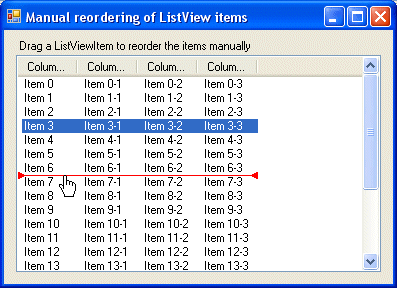
I want to reach LISTVIEW in the function of the red lines, is not to use the function to complete custom DRAW

14
Visual Basic 6 / [Problem] ListView Example of how to display the site
« en: Octubre 14, 2010, 01:30:42 am »
Hi All

My English is not good.

I would like to know how to reach this site's functionality, using vb


http://www.codeproject.com/KB/list/LVCustomReordering.aspx

ListViewCustomReorderSrc Examples

Páginas: [1]