Este es un proyecto Widget de un ampliador, el mismo cuenta con dos estilos diferentes y adems podremos optar entre cinco niveles de aumento, utiliza los mdulos clases c32bppDIB y cWidget.

Este es un proyecto Widget de un ampliador, el mismo cuenta con dos estilos diferentes y adems podremos optar entre cinco niveles de aumento, utiliza los mdulos clases c32bppDIB y cWidget.
Este es un módulo .bas que autocompleta un TextBox, a medida que vamos escribiendo, con diez sugerencias posibles de estos cuatro buscadores: Google, Yahoo, Youtube y Wikipedia.
Las consultas las hace vía internet y son muy rápidas ya que es un texto plano tal como pueden ver aquí buscando la palabra «casa» en Google.
Es importante que no confundan este ejemplo con el Api SHAutoComplete, ya que esta último completa con el historial de navegación, sólo encontré lo de autocompletar en estos cuatro buscadores mencionados, pero si alguien conoce algún otro sólo debe indicarle al módulo la Url.

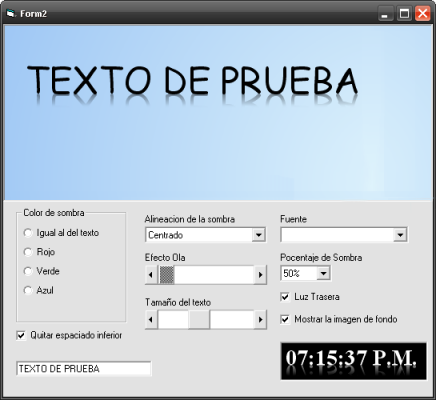
Esta es una función que se encarga de dibujar un texto con un efecto espejado al estilo Windows Vista.
'-----------------------------'
'Autor: Leandro Ascierto
'Fecha: 27/11/2008
'Tercera Revision
'-----------------------------'

Option Explicit
Private Declare Function GetTextMetrics Lib "gdi32.dll" Alias "GetTextMetricsA" (ByVal hdc As Long, ByRef lpMetrics As TEXTMETRIC) As Long
Private Declare Function AlphaBlend Lib "msimg32.dll" (ByVal hdc As Long, ByVal lInt As Long, ByVal lInt As Long, ByVal lInt As Long, ByVal lInt As Long, ByVal hdc As Long, ByVal lInt As Long, ByVal lInt As Long, ByVal lInt As Long, ByVal lInt As Long, ByVal BLENDFUNCT As Long) As Long
Private Declare Function CreateCompatibleDC Lib "gdi32.dll" (ByVal hdc As Long) As Long
Private Declare Function CreateCompatibleBitmap Lib "gdi32.dll" (ByVal hdc As Long, ByVal nWidth As Long, ByVal nHeight As Long) As Long
Private Declare Function SelectObject Lib "gdi32.dll" (ByVal hdc As Long, ByVal hObject As Long) As Long
Private Declare Function DeleteObject Lib "gdi32.dll" (ByVal hObject As Long) As Long
Private Declare Function DeleteDC Lib "gdi32.dll" (ByVal hdc As Long) As Long
Private Declare Function GetDC Lib "user32.dll" (ByVal hwnd As Long) As Long
Private Declare Function StretchBlt Lib "gdi32.dll" (ByVal hdc As Long, ByVal x As Long, ByVal y As Long, ByVal nWidth As Long, ByVal nHeight As Long, ByVal hSrcDC As Long, ByVal xSrc As Long, ByVal ySrc As Long, ByVal nSrcWidth As Long, ByVal nSrcHeight As Long, ByVal dwRop As Long) As Long
Private Declare Function DrawText Lib "user32.dll" Alias "DrawTextA" (ByVal hdc As Long, ByVal lpStr As String, ByVal nCount As Long, ByRef lpRect As RECT, ByVal wFormat As Long) As Long
Private Declare Function SetBkMode Lib "gdi32.dll" (ByVal hdc As Long, ByVal nBkMode As Long) As Long
Private Declare Function GetBkMode Lib "gdi32.dll" (ByVal hdc As Long) As Long
Private Declare Function GetCurrentObject Lib "gdi32.dll" (ByVal hdc As Long, ByVal uObjectType As Long) As Long
Private Declare Function GetTextColor Lib "gdi32.dll" (ByVal hdc As Long) As Long
Private Declare Function GetBkColor Lib "gdi32.dll" (ByVal hdc As Long) As Long
Private Declare Function SetTextColor Lib "gdi32.dll" (ByVal hdc As Long, ByVal crColor As Long) As Long
Private Declare Function OffsetRect Lib "user32" (lpRect As RECT, ByVal x As Long, ByVal y As Long) As Long
Private Declare Function ReleaseDC Lib "user32.dll" (ByVal hwnd As Long, ByVal hdc As Long) As Long
Private Declare Sub RtlMoveMemory Lib "kernel32.dll" (Destination As Any, Source As Any, ByVal Length As Long)

Private Type BLENDFUNCTION
    BlendOp As Byte
    BlendFlags As Byte
    SourceConstantAlpha As Byte
    AlphaFormat As Byte
End Type

Private Type RECT
    Left As Long
    Top As Long
    Right As Long
    Bottom As Long
End Type

Private Type TEXTMETRIC
    tmHeight As Long
    tmAscent As Long
    tmDescent As Long
    tmInternalLeading As Long
    tmExternalLeading As Long
    tmAveCharWidth As Long
    tmMaxCharWidth As Long
    tmWeight As Long
    tmOverhang As Long
    tmDigitizedAspectX As Long
    tmDigitizedAspectY As Long
    tmFirstChar As Byte
    tmLastChar As Byte
    tmDefaultChar As Byte
    tmBreakChar As Byte
    tmItalic As Byte
    tmUnderlined As Byte
    tmStruckOut As Byte
    tmPitchAndFamily As Byte
    tmCharSet As Byte
End Type

Private Const DT_CALCRECT           As Long = &H400
Private Const DT_BOTTOM             As Long = &H8
Private Const DT_SINGLELINE         As Long = &H20
Private Const OBJ_FONT              As Long = 6
Private Const AC_SRC_OVER           As Long = &H0

Public Enum tShadowDirection
    sdCenter = 0
    sdLeft = 1
    sdRight = 2
    sdInside = 3
    sdOutside = 4
End Enum

Public Enum tPercent
    Percent100 = 0
    Percent75 = 1
    Percent50 = 2
    Percent25 = 3
End Enum

Public Function DrawTextReflecion(DestDC As Long, _
                        ByVal x As Long, _
                        ByVal y As Long, _
                        Text As String, _
                        Optional ByVal IgnoreTMDescent As Boolean, _
                        Optional ByVal WaveIntesity As Long, _
                        Optional ByVal ShadowDirection As tShadowDirection, _
                        Optional ByVal Color As OLE_COLOR = -1, _
                        Optional ByVal ShadowPecent As tPercent = Percent75, _
                        Optional ByVal BackLight As Boolean = True)

    Dim ShadowLeft As Long, ShadowRight As Long
    Dim Left As Long, Top As Long, Width As Long, Height As Long
    Dim DC As Long, MemDC As Long, hBmp As Long, OldhBmp As Long, OldhFont As Long
    Dim BF As BLENDFUNCTION, lBF As Long
    Dim TM As TEXTMETRIC
    Dim Rec As RECT
    Dim i As Integer

    Dim Percent As Single

    'Calculamos el tamaño del texto
    DrawText DestDC, Text, Len(Text), Rec, DT_CALCRECT

    Width = Rec.Right
    Height = Rec.Bottom

    'Creamos un Bitmap
    DC = GetDC(0)
    MemDC = CreateCompatibleDC(DC)
    hBmp = CreateCompatibleBitmap(DC, Width, Height)
    OldhBmp = SelectObject(MemDC, hBmp)
    ReleaseDC 0&, DC

    'Copiamos la fuente de destino
    OldhFont = SelectObject(MemDC, GetCurrentObject(DestDC, OBJ_FONT))

    'Copiamos el BackMode de destino
    SetBkMode MemDC, GetBkMode(DestDC)

    'Copiamos el color de texto de destino
    SetTextColor MemDC, IIf(Color <> -1, Color, GetTextColor(DestDC))

    'Tomamos una captura del destino
    StretchBlt MemDC, 0, 0, Width, Height, DestDC, x, y + Height * 2, Width, -Height, vbSrcCopy

    OffsetRect Rec, 0, 0
    'dibujamos el texto
    DrawText MemDC, Text, Len(Text), Rec, DT_BOTTOM Or DT_SINGLELINE

    'obtenemos informacion de la metrica de la fuente.
    GetTextMetrics MemDC, TM

    Select Case ShadowPecent
        Case 0: Percent = TM.tmAscent / 1
        Case 1: Percent = TM.tmAscent / 1.25
        Case 2: Percent = TM.tmAscent / 1.65
        Case 3: Percent = TM.tmAscent / 2
        Case Else: Percent = TM.tmAscent
    End Select

    'pintamos el hdc utilizando AlphaBlend para provocar el espejado.
    For i = TM.tmDescent To Percent
        With BF
            .BlendOp = AC_SRC_OVER
            .SourceConstantAlpha = Abs(200 - ((20 * i) / Percent) * 10)
        End With
        RtlMoveMemory lBF, BF, 4

        Select Case ShadowDirection
            Case 1
                ShadowLeft = -i + TM.tmDescent
            Case 2
                ShadowLeft = i - TM.tmDescent
            Case 3
                ShadowLeft = -i + TM.tmDescent
                ShadowRight = (i - TM.tmDescent) * 2
            Case 4
                ShadowLeft = i - TM.tmDescent
                ShadowRight = -(i - TM.tmDescent) * 2
        End Select

        Top = y + Height - 1
        Left = x - (Rnd(i) * WaveIntesity) + ShadowLeft
        AlphaBlend DestDC, Left, Top + IIf(BackLight, i, -i), Width + ShadowRight, 1, MemDC, 0, Height - i, Width, 1, lBF
    Next

    OffsetRect Rec, x, y + IIf(IgnoreTMDescent And BackLight, TM.tmDescent * 2, 0)

    'Bibujamos el texto original
    DrawText DestDC, Text, Len(Text), Rec, DT_BOTTOM Or DT_SINGLELINE

    'limpiamos la memoria
    SelectObject MemDC, OldhFont
    SelectObject MemDC, OldhBmp
    DeleteDC MemDC
    DeleteObject hBmp
End Function
Función para rellenar un rectángulo en un hdc con parte o el total de otro hdc, la función es muy rápida en dibujar.

Option Explicit
' --------------------------------
' Autor Leandro Ascierto
' --------------------------------
Private Declare Function GetDC Lib "user32" (ByVal hwnd As Long) As Long
Private Declare Function CreateCompatibleDC Lib "gdi32" (ByVal hdc As Long) As Long
Private Declare Function CreateCompatibleBitmap Lib "gdi32" (ByVal hdc As Long, ByVal nWidth As Long, ByVal nHeight As Long) As Long
Private Declare Function SelectObject Lib "gdi32" (ByVal hdc As Long, ByVal hObject As Long) As Long
Private Declare Function DeleteDC Lib "gdi32" (ByVal hdc As Long) As Long
Private Declare Function DeleteObject Lib "gdi32.dll" (ByVal hObject As Long) As Long
Private Declare Function CreatePatternBrush Lib "gdi32.dll" (ByVal hBitmap As Long) As Long
Private Declare Function FillRect Lib "user32" (ByVal hdc As Long, lpRect As RECT, ByVal hBrush As Long) As Long
Private Declare Function SetRect Lib "user32" (lpRect As RECT, ByVal X1 As Long, ByVal Y1 As Long, ByVal X2 As Long, ByVal Y2 As Long) As Long
Private Declare Function BitBlt Lib "gdi32" (ByVal hDestDC As Long, ByVal x As Long, ByVal y As Long, ByVal nWidth As Long, ByVal nHeight As Long, ByVal hSrcDC As Long, ByVal xSrc As Long, ByVal ySrc As Long, ByVal dwRop As Long) As Long
Private Declare Function SetBrushOrgEx Lib "gdi32.dll" (ByVal hdc As Long, ByVal nXOrg As Long, ByVal nYOrg As Long, ByRef lppt As POINTAPI) As Long
Private Declare Function ReleaseDC Lib "user32.dll" (ByVal hwnd As Long, ByVal hdc As Long) As Long

Private Type POINTAPI
    x As Long
    y As Long
End Type

Private Type RECT
    Left As Long
    Top As Long
    Right As Long
    Bottom As Long
End Type

' Función que rellena un hdc con el contenido de otro en forma repetitiva
Private Sub FillRectEx(DestDC As Long, DestX As Long, DestY As Long, DestWidth As Long, DestHeight As Long, SrcDC As Long, SrcX As Long, SrcY As Long, SrcWidth As Long, SrcHeight As Long)

    Dim DC As Long
    Dim hDCMemory As Long
    Dim hBmp As Long
    Dim OldhBmp As Long
    Dim hBrush As Long
    Dim Rec As RECT
    Dim PT As POINTAPI

    DC = GetDC(0)
    hDCMemory = CreateCompatibleDC(0)
    hBmp = CreateCompatibleBitmap(DC, SrcWidth, SrcHeight)
    ReleaseDC 0&, DC
    OldhBmp = SelectObject(hDCMemory, hBmp)
    BitBlt hDCMemory, 0, 0, SrcWidth, SrcHeight, SrcDC, SrcX, SrcY, vbSrcCopy
    hBrush = CreatePatternBrush(hBmp)
    SetRect Rec, DestX, DestY, DestWidth + DestX, DestHeight + DestY

    SetBrushOrgEx hdc, DestX, DestY, PT
    FillRect DestDC, Rec, hBrush
    SetBrushOrgEx hdc, PT.x, PT.y, PT

    DeleteObject hBrush
    DeleteObject SelectObject(hDCMemory, OldhBmp)
    DeleteDC hDCMemory
 End Sub

Private Sub Form_Load()
    With Picture1
        .Visible = False
        .AutoSize = True
        .ScaleMode = vbPixels
        .AutoRedraw = True
        .Picture = Me.Icon
    End With
End Sub

Private Sub Form_Paint()
    FillRectEx Me.hdc, 0, 0, Me.ScaleWidth, Me.ScaleHeight, Picture1.hdc, 0, 0, Picture1.ScaleWidth, Picture1.ScaleHeight
End Sub
Este es una función para dibujar una selección al estilo Windows Vista o MSN, útil para hacer controles de usuarios o según la necesidad de cada uno. creo que si bien es hay unas cuantas Apis, la función es muy rápida en dibujar.

Option Explicit
' ---------------------------------------------------
' Autor: Leandro Ascierto
' ----------------------------------------------------

Private Declare Function GetDC Lib "user32" (ByVal hwnd As Long) As Long
Private Declare Function CreateCompatibleDC Lib "gdi32" (ByVal hdc As Long) As Long
Private Declare Function CreateCompatibleBitmap Lib "gdi32" (ByVal hdc As Long, ByVal nWidth As Long, ByVal nHeight As Long) As Long
Private Declare Function SelectObject Lib "gdi32" (ByVal hdc As Long, ByVal hObject As Long) As Long
Private Declare Function DeleteDC Lib "gdi32" (ByVal hdc As Long) As Long
Private Declare Function DeleteObject Lib "gdi32.dll" (ByVal hObject As Long) As Long
Private Declare Function CreatePatternBrush Lib "gdi32.dll" (ByVal hBitmap As Long) As Long
Private Declare Function SetPixelV Lib "gdi32.dll" (ByVal hdc As Long, ByVal x As Long, ByVal y As Long, ByVal crColor As Long) As Long
Private Declare Function RoundRect Lib "gdi32.dll" (ByVal hdc As Long, ByVal X1 As Long, ByVal Y1 As Long, ByVal X2 As Long, ByVal Y2 As Long, ByVal X3 As Long, ByVal Y3 As Long) As Long
Private Declare Function CreatePen Lib "gdi32.dll" (ByVal nPenStyle As Long, ByVal nWidth As Long, ByVal crColor As Long) As Long
Private Declare Function BitBlt Lib "gdi32" (ByVal hDestDC As Long, ByVal x As Long, ByVal y As Long, ByVal nWidth As Long, ByVal nHeight As Long, ByVal hSrcDC As Long, ByVal xSrc As Long, ByVal ySrc As Long, ByVal dwRop As Long) As Long
Private Declare Function OleTranslateColor Lib "oleaut32.dll" (ByVal lOleColor As Long, ByVal lHPalette As Long, ByVal lColorRef As Long) As Long
Private Declare Sub CopyMemory Lib "kernel32" Alias "RtlMoveMemory" (ByVal Destination As Long, ByVal Source As Long, ByVal Length As Long)
Private Declare Function ReleaseDC Lib "user32.dll" (ByVal hwnd As Long, ByVal hdc As Long) As Long

Private Type UcsRgbQuad
    R As Byte
    G As Byte
    B As Byte
    a As Byte
End Type

Private Sub DrawSelectionEx(DestDC As Long, DestX As Long, DestY As Long, DestWidth As Long, DestHeight As Long, oColorStar As Long, oColorEnd As Long)
    Dim DC As Long, hDCMemory As Long, hBmp As Long
    Dim hPen1 As Long, hPen2 As Long, hBrush As Long
    Dim OldhBmp As Long, OldhPen As Long, OldhBrush As Long
    Dim DivValue As Double
    Dim i As Long

    ' Creamos una Pluma oscura para el borde
    hPen1 = CreatePen(0, 1, pvAlphaBlend(vbBlack, oColorEnd, 10))

    ' Creamos un Pluma para un pequeño borde interior, bien claro
    hPen2 = CreatePen(0, 1, pvAlphaBlend(oColorStar, vbWhite, 10))

    ' Creamos un HDC temporal
    DC = GetDC(0)
    hDCMemory = CreateCompatibleDC(0)
    hBmp = CreateCompatibleBitmap(DC, 1, DestHeight)
    OldhBmp = SelectObject(hDCMemory, hBmp)

    ' Creamos un bucle haciendo un degradado
    For i = 1 To DestHeight
        DivValue = ((i * 255) / DestHeight)
        SetPixelV hDCMemory, 0, i, pvAlphaBlend(oColorEnd, oColorStar, DivValue)
    Next

    ' Creamos una brocha con el bmp
    hBrush = CreatePatternBrush(hBmp)

    ' Creamos un buffer temporal
    DeleteObject hBmp
    hBmp = CreateCompatibleBitmap(DC, DestWidth, DestHeight)
    Call SelectObject(hDCMemory, hBmp)

    ' Pintamos el destino en el buffer
    BitBlt hDCMemory, 0, 0, DestWidth, DestHeight, DestDC, DestX, DestY, vbSrcCopy

    ' Le asignamos la pluma al hdc de destino
    OldhPen = SelectObject(hDCMemory, hPen1)

    ' Pintamos un borde oscuro alrededor sin relleno
    RoundRect hDCMemory, 0, 0, DestWidth, DestHeight, 9, 9

    ' Asignamos la segunda pluma más clara
    Call SelectObject(hDCMemory, hPen2)

    ' Creamos y asignamos una brocha con el bmp de nuestro degradado
    OldhBrush = SelectObject(hDCMemory, hBrush)

    ' Pintamos un rectángulo redondeado con la pluma y la brocha
    RoundRect hDCMemory, 1, 1, DestWidth - 1, DestHeight - 1, 8, 8

    ' Pintamos el buffer en el destino
    BitBlt DestDC, DestX, DestY, DestWidth, DestHeight, hDCMemory, 0, 0, vbSrcCopy

    ' Descargamos todo
    SelectObject hDCMemory, OldhPen
    SelectObject hDCMemory, OldhBrush
    SelectObject hDCMemory, OldhBmp
    DeleteObject hPen1
    DeleteObject hPen2
    DeleteObject hBrush
    DeleteObject hBmp
    ReleaseDC 0&, DC
    DeleteDC hDCMemory

End Sub

' Función para trasladar un color a otro en porcentaje lAlpha(0 A 255)
Private Function pvAlphaBlend(ByVal clrFirst As Long, ByVal clrSecond As Long, ByVal lAlpha As Long) As Long

    Dim clrFore         As UcsRgbQuad
    Dim clrBack         As UcsRgbQuad

    OleTranslateColor clrFirst, 0, VarPtr(clrFore)
    OleTranslateColor clrSecond, 0, VarPtr(clrBack)
    With clrFore
        .R = (.R * lAlpha + clrBack.R * (255 - lAlpha)) / 255
        .G = (.G * lAlpha + clrBack.G * (255 - lAlpha)) / 255
        .B = (.B * lAlpha + clrBack.B * (255 - lAlpha)) / 255
    End With

    CopyMemory VarPtr(pvAlphaBlend), VarPtr(clrFore), 4

End Function

Private Sub Form_Load()
    Me.ScaleMode = vbPixels
    Me.FontName = "Calibri"
    Me.FontSize = 12
    Me.BackColor = vbWhite
    Me.Width = 8500
    Me.Height = 8700
    HScroll1.Max = 255
    HScroll1.Value = 70
    HScroll1.Move 320, 210, 230, 30
End Sub

' Ejemplo de uso
Private Sub Form_Paint()

    Dim i As Integer

    ' Colores empleados en Windows Vista, y MSN
    DrawSelectionEx Me.hdc, 320, 10, 100, 100, RGB(249, 253, 255), RGB(234, 247, 255)
    DrawSelectionEx Me.hdc, 440, 10, 100, 100, RGB(251, 251, 251), RGB(231, 231, 231)

    ' Con quince colores diferentes
    For i = 0 To 15
        DrawSelectionEx Me.hdc, 10, 10 + (i * 35), 300, 30, Me.BackColor, pvAlphaBlend(QBColor(i), Me.BackColor, HScroll1.Value)
    Next

    ' Utilizando el color resalte del sistema
    DrawSelectionEx Me.hdc, 320, 120, 220, 70, Me.BackColor, pvAlphaBlend(vbHighlight, Me.BackColor, 50)

    Me.CurrentX = 330
    Me.CurrentY = 145
    Me.Print "Color de selección del Sistema"

End Sub

Private Sub HScroll1_Change()
    Form_Paint
End Sub
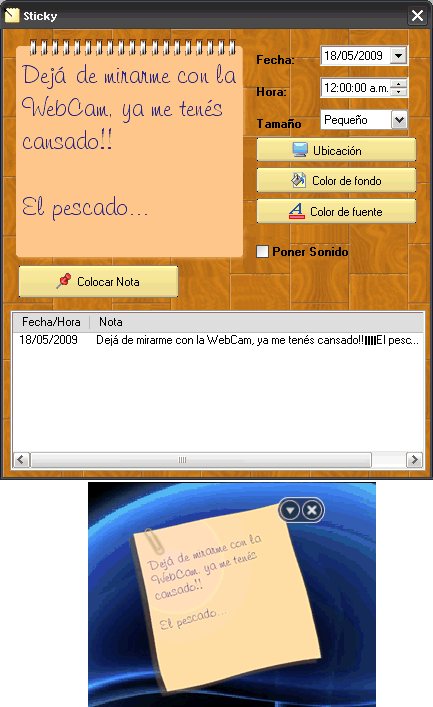
Es un Proyecto WidGet que consta de un anotador o notas recordatorias. Cuenta con varias opciones, tales como: modificar el color de texto, color de fondo, tamaño, ubicación, sonido, fecha y hora de cuando se quiera mostrar.
Este proyecto está algo viejito, as que hay cosas que en la cWidget ya las hace automáticamente, pero bien no tena ganas de reformarlo, as que lo dejo como lo hice en un principio, además tiene como dependencia Microsoft Windows Common Controls.
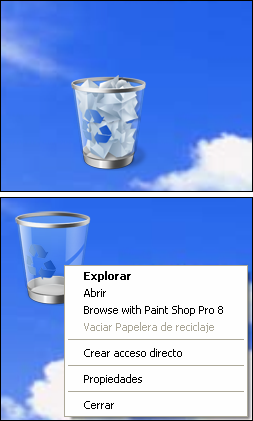
Este es un Proyecto WidGet que consta de una Papelera de Reciclaje, al igual que la de Windows esta tiene el menú contextual, se puede arrastrar y soltar, también posee un sonido para cuando se vacía, y se muestra en dos estados llena y vacía.
Este es un Proyecto WidGet de Yahoo Weather en Visual Basic, utiliza la CWL.dll (también está el código de fuente junto al proyecto), utilicé la DLL para poder estar mejor organizado el código, sino serían muchas clases en el proyecto, recuerden que para poder correrlo primero deberán registrar la DLL (en la carpeta Library hay un .bat para que esto sea más fácil) aquellos que utilicen Windows Vista deberán seguir estos procedimientos para poder registrar la DLL.
Los datos del tiempo los obtiene de un XML que descarga desde www.weather.com, la clase GDIRender.cls la utilicé porque no encontré dentro de c32bppDIB.cls la manera de poder dibujar las imágenes de forma estiradas, también vale aclarar que este proyecto es educativo y no comercial ya que los gráficos están patentados a nombre de Yahoo Weather. cinemitas
