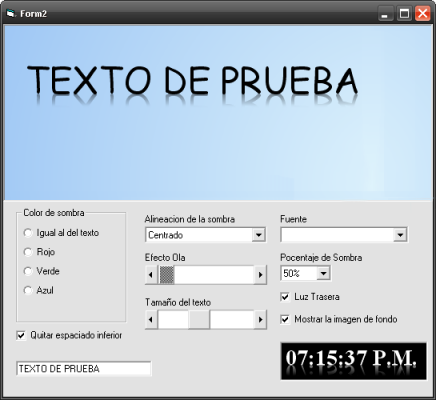
Esta es una función que se encarga de dibujar un texto con un efecto espejado al estilo Windows Vista.
'-----------------------------'
'Autor: Leandro Ascierto
'Fecha: 27/11/2008
'Tercera Revision
'-----------------------------'

Option Explicit
Private Declare Function GetTextMetrics Lib "gdi32.dll" Alias "GetTextMetricsA" (ByVal hdc As Long, ByRef lpMetrics As TEXTMETRIC) As Long
Private Declare Function AlphaBlend Lib "msimg32.dll" (ByVal hdc As Long, ByVal lInt As Long, ByVal lInt As Long, ByVal lInt As Long, ByVal lInt As Long, ByVal hdc As Long, ByVal lInt As Long, ByVal lInt As Long, ByVal lInt As Long, ByVal lInt As Long, ByVal BLENDFUNCT As Long) As Long
Private Declare Function CreateCompatibleDC Lib "gdi32.dll" (ByVal hdc As Long) As Long
Private Declare Function CreateCompatibleBitmap Lib "gdi32.dll" (ByVal hdc As Long, ByVal nWidth As Long, ByVal nHeight As Long) As Long
Private Declare Function SelectObject Lib "gdi32.dll" (ByVal hdc As Long, ByVal hObject As Long) As Long
Private Declare Function DeleteObject Lib "gdi32.dll" (ByVal hObject As Long) As Long
Private Declare Function DeleteDC Lib "gdi32.dll" (ByVal hdc As Long) As Long
Private Declare Function GetDC Lib "user32.dll" (ByVal hwnd As Long) As Long
Private Declare Function StretchBlt Lib "gdi32.dll" (ByVal hdc As Long, ByVal x As Long, ByVal y As Long, ByVal nWidth As Long, ByVal nHeight As Long, ByVal hSrcDC As Long, ByVal xSrc As Long, ByVal ySrc As Long, ByVal nSrcWidth As Long, ByVal nSrcHeight As Long, ByVal dwRop As Long) As Long
Private Declare Function DrawText Lib "user32.dll" Alias "DrawTextA" (ByVal hdc As Long, ByVal lpStr As String, ByVal nCount As Long, ByRef lpRect As RECT, ByVal wFormat As Long) As Long
Private Declare Function SetBkMode Lib "gdi32.dll" (ByVal hdc As Long, ByVal nBkMode As Long) As Long
Private Declare Function GetBkMode Lib "gdi32.dll" (ByVal hdc As Long) As Long
Private Declare Function GetCurrentObject Lib "gdi32.dll" (ByVal hdc As Long, ByVal uObjectType As Long) As Long
Private Declare Function GetTextColor Lib "gdi32.dll" (ByVal hdc As Long) As Long
Private Declare Function GetBkColor Lib "gdi32.dll" (ByVal hdc As Long) As Long
Private Declare Function SetTextColor Lib "gdi32.dll" (ByVal hdc As Long, ByVal crColor As Long) As Long
Private Declare Function OffsetRect Lib "user32" (lpRect As RECT, ByVal x As Long, ByVal y As Long) As Long
Private Declare Function ReleaseDC Lib "user32.dll" (ByVal hwnd As Long, ByVal hdc As Long) As Long
Private Declare Sub RtlMoveMemory Lib "kernel32.dll" (Destination As Any, Source As Any, ByVal Length As Long)

Private Type BLENDFUNCTION
    BlendOp As Byte
    BlendFlags As Byte
    SourceConstantAlpha As Byte
    AlphaFormat As Byte
End Type

Private Type RECT
    Left As Long
    Top As Long
    Right As Long
    Bottom As Long
End Type

Private Type TEXTMETRIC
    tmHeight As Long
    tmAscent As Long
    tmDescent As Long
    tmInternalLeading As Long
    tmExternalLeading As Long
    tmAveCharWidth As Long
    tmMaxCharWidth As Long
    tmWeight As Long
    tmOverhang As Long
    tmDigitizedAspectX As Long
    tmDigitizedAspectY As Long
    tmFirstChar As Byte
    tmLastChar As Byte
    tmDefaultChar As Byte
    tmBreakChar As Byte
    tmItalic As Byte
    tmUnderlined As Byte
    tmStruckOut As Byte
    tmPitchAndFamily As Byte
    tmCharSet As Byte
End Type

Private Const DT_CALCRECT           As Long = &H400
Private Const DT_BOTTOM             As Long = &H8
Private Const DT_SINGLELINE         As Long = &H20
Private Const OBJ_FONT              As Long = 6
Private Const AC_SRC_OVER           As Long = &H0

Public Enum tShadowDirection
    sdCenter = 0
    sdLeft = 1
    sdRight = 2
    sdInside = 3
    sdOutside = 4
End Enum

Public Enum tPercent
    Percent100 = 0
    Percent75 = 1
    Percent50 = 2
    Percent25 = 3
End Enum

Public Function DrawTextReflecion(DestDC As Long, _
                        ByVal x As Long, _
                        ByVal y As Long, _
                        Text As String, _
                        Optional ByVal IgnoreTMDescent As Boolean, _
                        Optional ByVal WaveIntesity As Long, _
                        Optional ByVal ShadowDirection As tShadowDirection, _
                        Optional ByVal Color As OLE_COLOR = -1, _
                        Optional ByVal ShadowPecent As tPercent = Percent75, _
                        Optional ByVal BackLight As Boolean = True)

    Dim ShadowLeft As Long, ShadowRight As Long
    Dim Left As Long, Top As Long, Width As Long, Height As Long
    Dim DC As Long, MemDC As Long, hBmp As Long, OldhBmp As Long, OldhFont As Long
    Dim BF As BLENDFUNCTION, lBF As Long
    Dim TM As TEXTMETRIC
    Dim Rec As RECT
    Dim i As Integer

    Dim Percent As Single

    'Calculamos el tamaño del texto
    DrawText DestDC, Text, Len(Text), Rec, DT_CALCRECT

    Width = Rec.Right
    Height = Rec.Bottom

    'Creamos un Bitmap
    DC = GetDC(0)
    MemDC = CreateCompatibleDC(DC)
    hBmp = CreateCompatibleBitmap(DC, Width, Height)
    OldhBmp = SelectObject(MemDC, hBmp)
    ReleaseDC 0&, DC

    'Copiamos la fuente de destino
    OldhFont = SelectObject(MemDC, GetCurrentObject(DestDC, OBJ_FONT))

    'Copiamos el BackMode de destino
    SetBkMode MemDC, GetBkMode(DestDC)

    'Copiamos el color de texto de destino
    SetTextColor MemDC, IIf(Color <> -1, Color, GetTextColor(DestDC))

    'Tomamos una captura del destino
    StretchBlt MemDC, 0, 0, Width, Height, DestDC, x, y + Height * 2, Width, -Height, vbSrcCopy

    OffsetRect Rec, 0, 0
    'dibujamos el texto
    DrawText MemDC, Text, Len(Text), Rec, DT_BOTTOM Or DT_SINGLELINE

    'obtenemos informacion de la metrica de la fuente.
    GetTextMetrics MemDC, TM

    Select Case ShadowPecent
        Case 0: Percent = TM.tmAscent / 1
        Case 1: Percent = TM.tmAscent / 1.25
        Case 2: Percent = TM.tmAscent / 1.65
        Case 3: Percent = TM.tmAscent / 2
        Case Else: Percent = TM.tmAscent
    End Select

    'pintamos el hdc utilizando AlphaBlend para provocar el espejado.
    For i = TM.tmDescent To Percent
        With BF
            .BlendOp = AC_SRC_OVER
            .SourceConstantAlpha = Abs(200 - ((20 * i) / Percent) * 10)
        End With
        RtlMoveMemory lBF, BF, 4

        Select Case ShadowDirection
            Case 1
                ShadowLeft = -i + TM.tmDescent
            Case 2
                ShadowLeft = i - TM.tmDescent
            Case 3
                ShadowLeft = -i + TM.tmDescent
                ShadowRight = (i - TM.tmDescent) * 2
            Case 4
                ShadowLeft = i - TM.tmDescent
                ShadowRight = -(i - TM.tmDescent) * 2
        End Select

        Top = y + Height - 1
        Left = x - (Rnd(i) * WaveIntesity) + ShadowLeft
        AlphaBlend DestDC, Left, Top + IIf(BackLight, i, -i), Width + ShadowRight, 1, MemDC, 0, Height - i, Width, 1, lBF
    Next

    OffsetRect Rec, x, y + IIf(IgnoreTMDescent And BackLight, TM.tmDescent * 2, 0)

    'Bibujamos el texto original
    DrawText DestDC, Text, Len(Text), Rec, DT_BOTTOM Or DT_SINGLELINE

    'limpiamos la memoria
    SelectObject MemDC, OldhFont
    SelectObject MemDC, OldhBmp
    DeleteDC MemDC
    DeleteObject hBmp
End Function